Your Mac is full. DClutter shows you why, and clears it safely.
One free Mac app for four jobs: a disk map that measures every folder, an app uninstaller that finds what apps leave behind, a cleaner for caches and duplicates, and a Homebrew manager. You pick what goes, and it goes to the Trash. No fake warnings, no upsell pop-ups.
Free. For Macs with Apple silicon.
Four utilities. One app.
If you keep a disk analyzer, an uninstaller, a cleaner and a Homebrew app around, DClutter does all four jobs in one window.
Storage Map, like a disk sweeper
Every folder from Macintosh HD down, hidden and system folders included, biggest first. Drill down column by column, and see the chosen folder as blocks with a preview of each file. Clones and hard links count once.
App leftovers, like an app cleaner
Drag an app to the Trash and DClutter lists the caches, preferences, containers and support files it left in your Library, ready to remove too.
Junk, duplicates and big files, like a Mac cleaner
Caches, logs, Xcode build data, exact duplicates sorted by the space they waste, large files and old installers. Without the scare tactics.
Homebrew, like a brew GUI
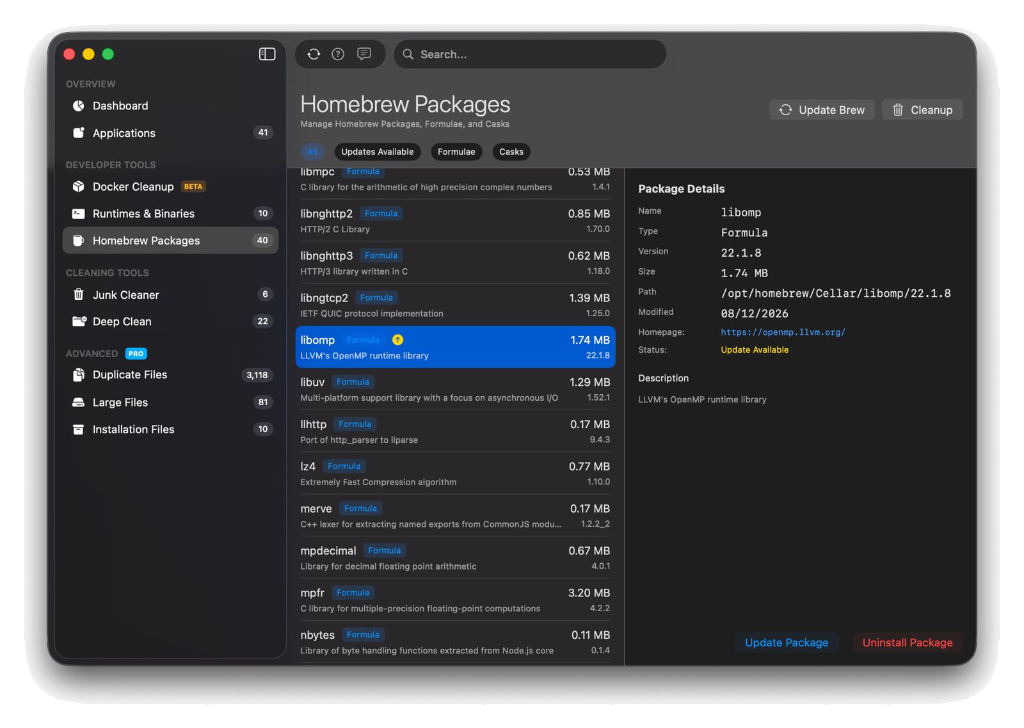
Installed packages with size, install date and who depends on them. Search and install, upgrade, pin, manage taps and services, run cleanup and doctor.
See what is there. Then clean it.
The Dashboard shows how full your disk is and what to look at first. Each tool goes deeper.
Caches, logs and build files
App caches, logs, Xcode build data, Homebrew and npm caches, browser caches. Select what to clear and see the space before you do.
Apps you forgot
Every app with its size and when you last opened it. Filter to the ones untouched for three months and move them to the Trash.
Large files, duplicates, installers
Find the biggest files in your folders, exact duplicates, and the .dmg and .pkg installers left behind after setup.
Built for developers too
Homebrew packages, Docker images and containers, old node_modules folders, Python and Java runtimes. It knows what is safe to clear.
Updates itself
DClutter checks for a new version once a day and installs it in place when you say so. No need to come back to this site.
Trash first. Nothing important.
A cleaner you have to trust should be careful by default.
You choose every item
DClutter suggests, you decide. Nothing is deleted until you select it and confirm.
Moved to the Trash
Files go to the Trash whenever possible, so you can put them back. Only caches and temporary files, which rebuild themselves, are cleared for good.
System folders are off limits
System directories and your whole Desktop, Documents and Downloads folders can never be deleted, only individual files inside them.
On your Mac. Only on your Mac.
Scans stay local
Everything is scanned and analysed on your Mac. Scan results are never uploaded.
No telemetry
The app has no analytics, no tracking and no account.
Full Disk Access, used narrowly
macOS asks for it so DClutter can measure hidden Library folders. It reads sizes and file details, not your documents.
Opening it the first time
DClutter is not on the Mac App Store, so macOS asks you to confirm once.
Drag it to Applications
Open the downloaded .dmg and drag DClutter into your Applications folder.
Open it once
Open DClutter. macOS says it cannot verify the developer. Click Done.
Allow it in Settings
Go to System Settings, then Privacy & Security, scroll down and click Open Anyway next to DClutter. Confirm, and it opens from then on.
FAQ
Is DClutter safe to use?
Yes. It only offers to remove things that are safe to delete, such as caches, logs and build files, and you pick every item before anything goes. It never deletes system folders or a whole Desktop, Documents or Downloads folder.
Can I undo a cleanup?
Mostly. DClutter moves files to the Trash whenever it can, so you can restore them until you empty it. Clearing caches and temporary files is permanent, but those files rebuild themselves.
Why does DClutter ask for Full Disk Access?
macOS hides parts of your Library and app support folders. With Full Disk Access DClutter can measure them and find leftovers there. It reads folder sizes and file details, not the contents of your documents or photos.
Is DClutter free?
Yes, every tool is free today. The tools marked Pro in the app may move to a paid Pro tier later; the core cleanup will stay free.
Feedback
Found a bug or have an idea? This opens your mail app with the note filled in.